

Interview Intelligence is available on Pro and higher plans.
What is Interview Intelligence?
Interview Intelligence automates everything that happens around your interviews — recording, transcription, evaluation, and reporting. Run the meeting normally; Hirempire captures the conversation in the background and produces a structured report when it’s done. It replaces manual note-taking and brings consistency to multi-interviewer panels, so your team can make faster, less biased hiring decisions. What it delivers:- 100% of interviews captured automatically
- Faster candidate reviews with scored, searchable transcripts
- Zero manual notes required
How it works
1
Run the interview
Conduct the interview as you normally would in your video tool (Google Meet, Zoom, etc.). Hirempire’s AI bot joins the call and records in the background — no extra setup needed during the meeting.
2
AI processes the recording
After the call ends, Hirempire transcribes the audio, maps each response to the job’s requirements, and analyzes the candidate’s performance. Processing typically takes a few minutes — the meeting card shows a processing indicator while it runs.
3
Review insights instantly
Once done, a View Interview Intelligence button appears on the meeting detail card. You’ll have a full scorecard, transcript, and highlights ready before your next meeting — and one-click sharing for the team.
What’s in the report
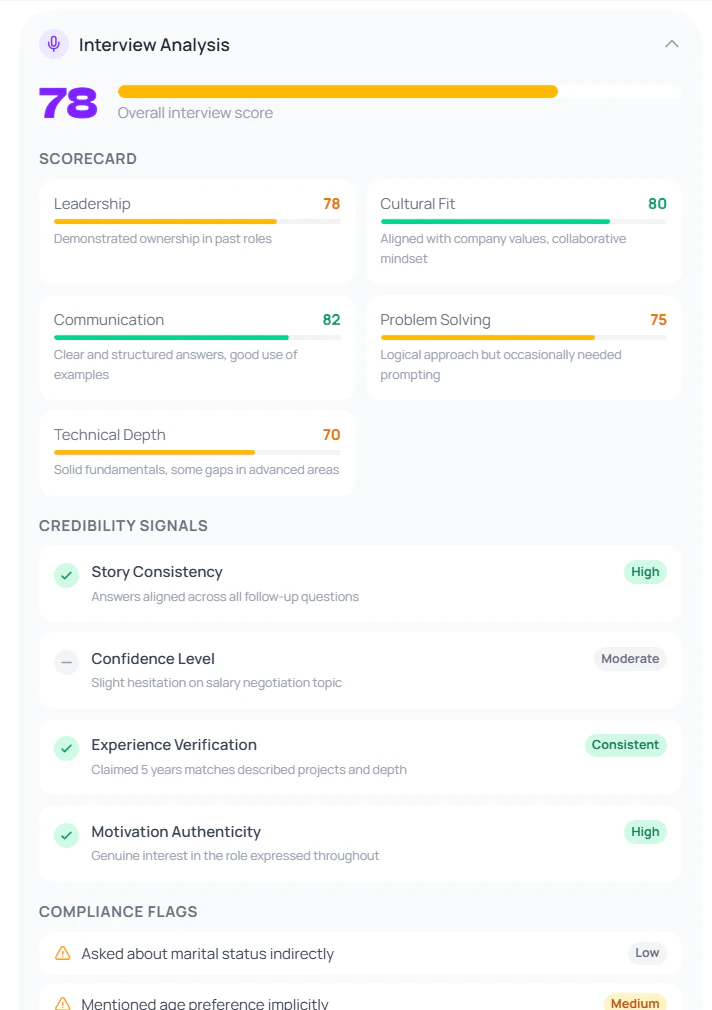
Overall Score
Overall Score
A 0–100 score representing the candidate’s overall performance in the interview. Calculated from all evaluated competencies.
Structured Scorecard
Structured Scorecard
A multi-competency breakdown — communication, technical skills, problem solving, culture fit, and more. Each competency gets an individual score and brief notes.
AI Decision
AI Decision
A categorical recommendation: Accept, Hold, or Reject — along with the plain-language reasoning behind it.
Automatic Transcription
Automatic Transcription
A full, searchable transcript of the entire interview, with both interviewer and candidate dialogue clearly attributed. Available the moment processing completes.
Question & Answer Analysis
Question & Answer Analysis
Each question and the candidate’s response is reviewed individually. The AI surfaces red flags — vague answers, inconsistencies, or concerning responses — so you can jump straight to the moments that matter.
Time-Stamped Highlights
Time-Stamped Highlights
Standout moments — strong answers, red flags, key examples — are detected automatically and time-stamped. Highlights are shareable as video clips so you can send a teammate the exact moment instead of the whole recording.
Instant Summary
Instant Summary
An executive overview of the interview, ready for one-click team distribution. Useful for hiring panels and async stakeholder updates.
Credibility Signals
Credibility Signals
Indicators the AI detected about the candidate’s authenticity — confidence level, consistency of answers, and any flags worth noting.
Engagement Timeline
Engagement Timeline
A timeline view of how engaged the candidate was throughout the interview — energy levels, response depth, and participation patterns.
Interviewer Analysis
Interviewer Analysis
Feedback on the interview itself — question quality, time balance, follow-up depth. Helps interviewers improve over time.
Compliance Flags
Compliance Flags
Highlights any potentially problematic questions or topics raised during the interview to help maintain fair and compliant hiring practices.
Candidate Feedback
Candidate Feedback
A summary of the candidate’s own signals about their interest level and how they perceived the role and company.