

Available for all plans with AI evaluation credits
Revolutionary AI Evaluation
1. Install & Connect
Add the extension and connect your Hirempire account in under 60 seconds
2. Browse LinkedIn
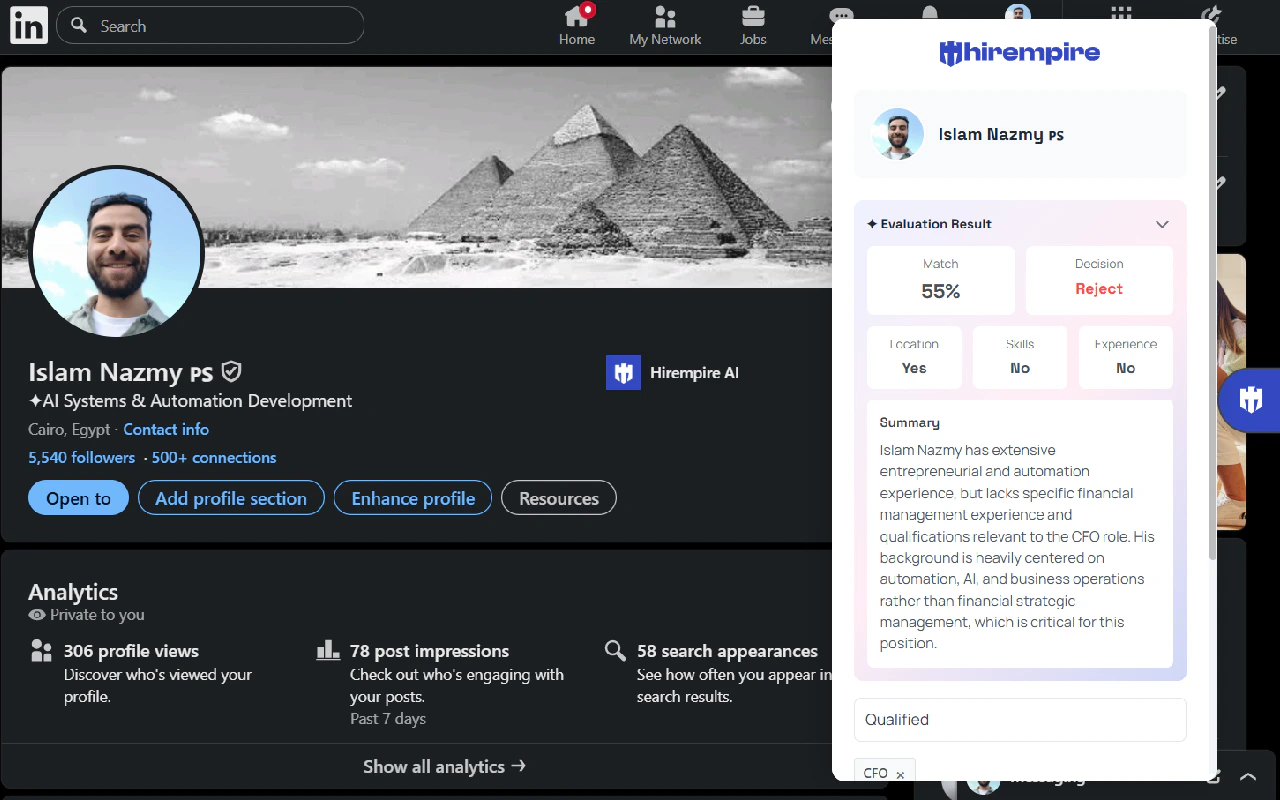
Visit any candidate profile - our AI instantly analyzes their fit
3. Get Smart Insights
Receive detailed AI evaluation with match score and key insights
How AI Evaluation Works
Instant Smart Analysis
- Visit any LinkedIn profile you’re considering
- Click the Hirempire extension - AI analysis starts immediately
- Choose a job to evalute the LinkedIn prospect with
- Get comprehensive evaluation in under 5 seconds:
- Match Score (0-100) based on job requirements
- Key Strengths that make them a good fit
- Potential Concerns to consider
- Skills Gap Analysis compared to your job posting
- Experience Relevance scoring
AI-Powered Features
Smart Match Scoring
- Skill alignment analysis - How well their skills match your requirements
- Experience weight scoring - Years and relevance of their background
- Industry fit assessment - Cultural and sector compatibility
- Career progression evaluation - Growth trajectory analysis
Intelligent Insights
- Automated strengths identification - Top 3-5 reasons to consider them
- Risk flag detection - Potential red flags or concerns
Instant Decision Support
- “Reject”, “Hold”, or “Accept” recommendations with confidence scores
What the AI Analyzes
- Experience Match
- Skills & Expertise
- Cultural Fit
- Role relevance scoring for each position
- Company quality assessment and growth indicators
- Tenure patterns and job stability analysis
- Career progression and advancement speed
- Leadership experience and team management
Why Recruiters Love AI Evaluation
10x Faster Screening
- Eliminate manual profile review - AI does the heavy lifting
- Instant qualification decisions based on data, not gut feeling
- Focus time on top candidates identified by AI scoring
- Reduce screening time from 10 minutes to 30 seconds per candidate
Better Hiring Decisions
- Objective evaluation criteria removes unconscious bias
- Consistent scoring methodology across all candidates
- Data-driven insights support hiring recommendations
- Predictive analytics improve long-term hire success
Competitive Advantage
- First-mover advantage on top talent identification
- Speed to contact beats competitors to candidates
- Quality over quantity approach to candidate outreach
- Higher conversion rates from better initial screening
Step-by-Step AI Evaluation Guide
Getting Started
Step 1: Install & Setup
Step 1: Install & Setup
- Click Chrome Web Store link
- Click “Add to Chrome” and confirm installation
- Sign in with your Hirempire credentials
- Grant LinkedIn access permissions for AI analysis
Step 2: Configure Job Requirements
Step 2: Configure Job Requirements
- Open your Hirempire dashboard
- Select the job you’re recruiting for
- Ensure AI requirements are configured:
- Required skills and experience levels
- Nice-to-have qualifications
- Company culture preferences
- Salary range and location preferences
Step 3: Start AI-Powered Screening
Step 3: Start AI-Powered Screening
- Browse LinkedIn as normal
- Visit any candidate profile that interests you
- Click the Hirempire extension icon
- Watch as AI instantly evaluates the candidate
- Review match score, insights, and recommendation
- Add top candidates directly to your pipeline
Understanding AI Results
Match Score Breakdown
Match Score Breakdown
Score Ranges:
- 90-100: Exceptional match - immediate priority candidate
- 80-89: Strong match - definitely worth pursuing
- 70-79: Good potential - consider based on other factors
- 60-69: Moderate fit - may work for specific situations
- Below 60: Poor match - likely not worth pursuing
- Skills alignment (30%)
- Experience relevance (25%)
- Career progression (20%)
- Cultural fit indicators (15%)
- Market availability (10%)
AI Insights Categories
AI Insights Categories
- Key Strengths: Top 3-5 compelling reasons to pursue this candidate
- Potential Concerns: Areas that might be challenges or risks
- Skills Analysis: Detailed breakdown of technical and soft skills match
- Experience Relevance: How their background aligns with your job’s needs
Advanced AI Features
Predictive Analytics
- Success probability based on similar successful hires
- Time-to-productivity estimates for role ramp-up
- Retention likelihood using profile signals
- Performance predictions based on background patterns
Market Intelligence Integration
- Competitive landscape analysis for similar profiles
- Salary benchmarking with real-time market data
- Availability windows based on LinkedIn activity patterns
- Response rate optimization for outreach messaging
Learning & Improvement
- Feedback loop integration - AI learns from your hiring decisions
- Custom scoring weights based on your successful hires
- Industry-specific models for specialized roles
- Continuous model updates with latest hiring trends
Requirements & Pricing
What You Need
- Chrome or Edge browser (latest version)
- Active Hirempire account with AI evaluation credits
- LinkedIn account with profile access
- Configured job requirements in Hirempire dashboard
AI Evaluation Credits
- Free Plan: 10 AI evaluations per month
- Starter Plan: 100 evaluations per month
- Pro Plan: 500 evaluations per month
- Premium Plan: Unlimited evaluations
AI evaluation credits reset monthly. Unused credits don’t roll over. Additional credits available for purchase.
Troubleshooting & Support
AI Evaluation Not Working?
AI Evaluation Not Working?
Common Issues:
- Check that you have remaining AI evaluation credits
- Ensure the LinkedIn profile is public and complete
- Verify you’re signed into your Hirempire account
- Refresh the page and try again
- AI recommendations improve with usage and feedback
- Report inaccurate evaluations to help train the model
- Consider multiple data points beyond AI scoring
- Use AI as a screening tool, not final decision maker
Privacy & Compliance
Privacy & Compliance
Data Security:
- All AI processing happens on secure Hirempire servers
- No candidate data stored permanently during evaluation
- LinkedIn compliance with terms of service maintained
- GDPR and privacy regulation adherence
- Use AI evaluation for initial screening only
- Always conduct proper interviews for final decisions
- Respect LinkedIn’s professional networking purpose
- Follow equal opportunity employment practices
Transform Your Recruitment with AI
Stop wasting time on manual profile reviews. Get instant AI-powered candidate evaluations from LinkedIn.
Install AI Extension - Start Free Trial