

AI Pre-Screen is available on Pro and higher plans.
What is AI Pre-Screen?
AI Pre-Screen is an asynchronous, proctored interview that runs entirely on its own — no scheduling, no recruiter time, no extra tools. You send a candidate a one-time link, the AI runs a live structured interview with proctoring active, and you get a scored transcript and recommendation as soon as they finish. It’s how you replace the first-round phone screen with something faster, more consistent, and less biased.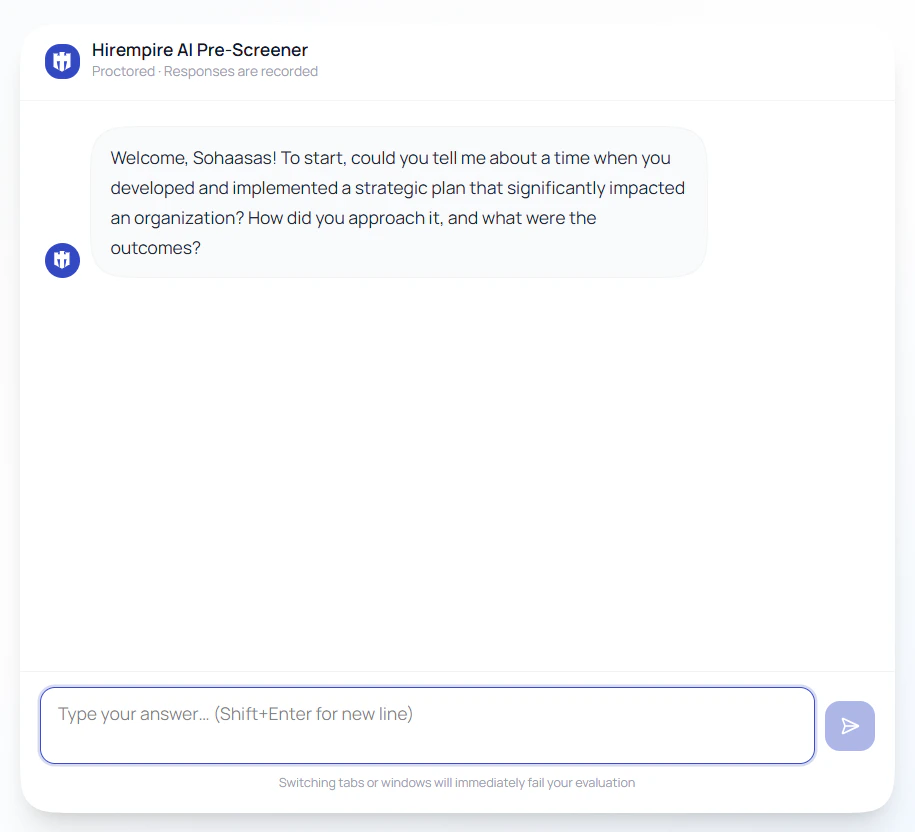
How it works
1
Send the link
From an applicant card, click AI Pre-Screen. A unique, one-time interview link is generated and emailed to the candidate.
2
Candidate interviews
The candidate accepts the ground rules, then has a live conversation with the AI. Proctoring is active throughout — tab-switching, paste attempts, and other integrity violations are detected in real time.
3
Review results
You’re notified the moment the interview completes (or terminates early). Open the candidate panel to see the score, scorecard, AI recommendation, and full transcript.
Proctoring & integrity
Candidates are told upfront that this is a proctored evaluation. The session enforces several anti-cheating measures:
The AI also probes for specifics — vague or generic answers get followed up on, so candidates can’t coast on rehearsed responses.
What you get back
When the interview ends, the candidate’s panel includes a full evaluation: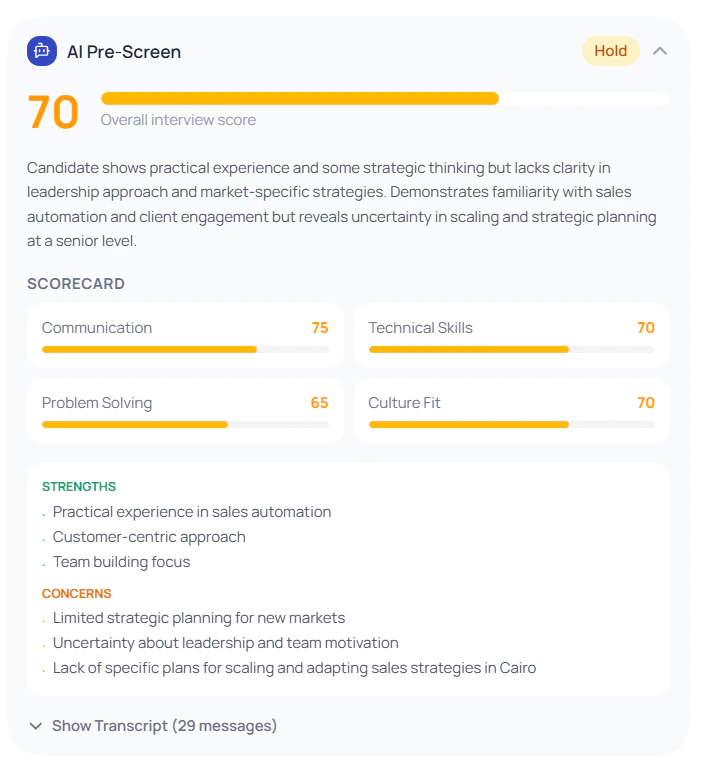
Overall Score
A single number summarizing how the candidate performed across all evaluated dimensions.
Scorecard
Per-dimension breakdown with individual scores and brief notes on each area assessed.
AI Recommendation
A plain-language hiring recommendation with the reasoning behind it.
Credibility Signals
Flags around answer authenticity, consistency, and any integrity violations during the session.
Full Transcript
Complete record of the conversation — questions asked and answers given — stored permanently on the candidate record.
Instant Notifications
Get notified the moment the candidate completes — or if the session terminates early due to a violation.
When to use it
AI Pre-Screen replaces the first-round phone screen. Use it when:- You have high applicant volume and need to triage faster
- You want consistent evaluation across every applicant for a role
- You want to reduce bias in the first-round filter
- Your candidates are distributed across time zones and scheduling is painful
Sending a Pre-Screen
- Open the candidate from the Talents page or a job’s applicants list
- Click AI Pre-Screen on the applicant card
- The candidate receives an email with a unique link
- Track status from the candidate panel — Sent, In Progress, Completed, or Terminated
Best practices
Related features
- AI Screening — automatic CV analysis and job-fit scoring on every application
- Interview Intelligence — AI analysis of full live recorded interviews
- Hirempire AI — the AI capabilities running across the platform