> ## Documentation Index
> Fetch the complete documentation index at: https://docs.hirempire.com/llms.txt
> Use this file to discover all available pages before exploring further.
# Chrome Extension
> AI-Powered Candidate Evaluation from LinkedIn
Get instant AI-powered candidate evaluations directly from LinkedIn profiles. No more guesswork - know if a candidate is worth pursuing in seconds.
Available for all plans with AI evaluation credits
Turn every LinkedIn profile into an instant candidate assessment
## Revolutionary AI Evaluation
Add the extension and connect your Hirempire account in under 60 seconds
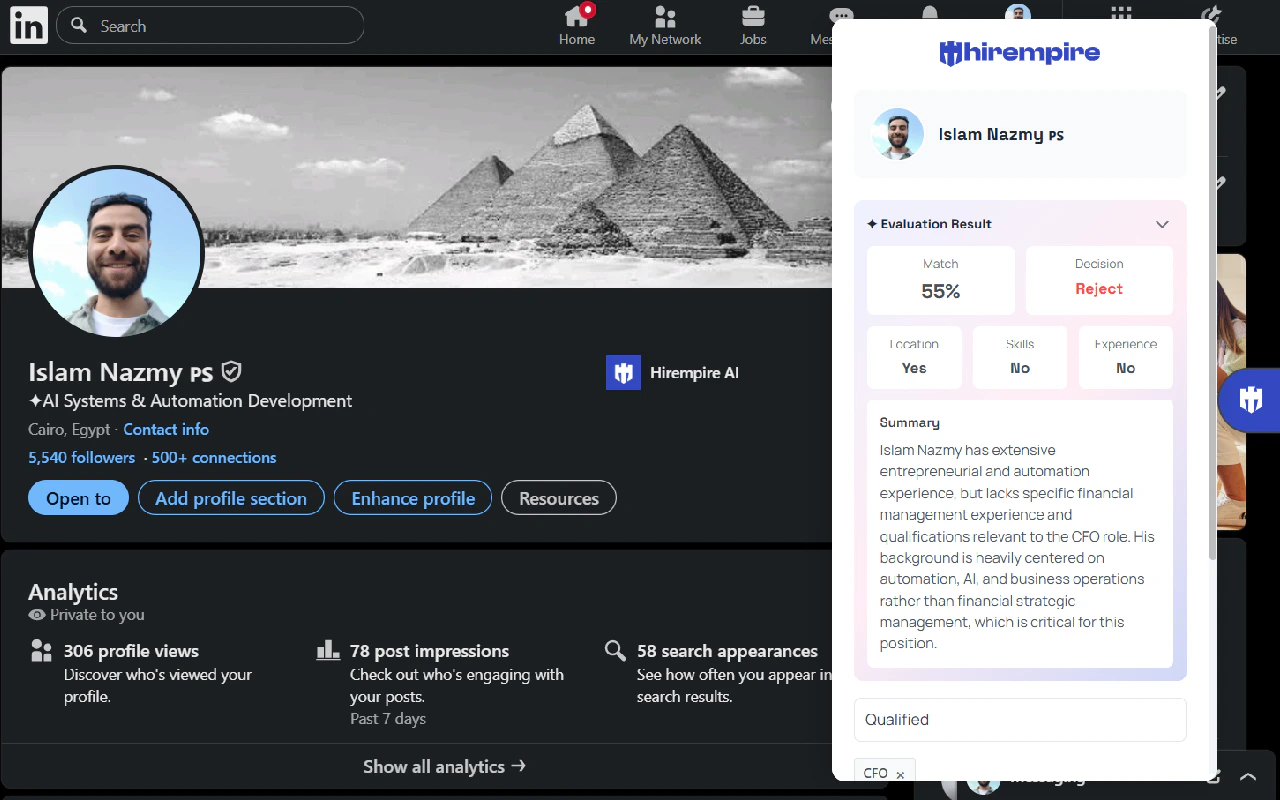
Visit any candidate profile - our AI instantly analyzes their fit
Receive detailed AI evaluation with match score and key insights
## How AI Evaluation Works
### **Instant Smart Analysis**
1. **Visit any LinkedIn profile** you're considering
2. **Click the Hirempire extension** - AI analysis starts immediately
3. **Choose a job** to evalute the LinkedIn prospect with
4. **Get comprehensive evaluation** in under 5 seconds:
* **Match Score** (0-100) based on job requirements
* **Key Strengths** that make them a good fit
* **Potential Concerns** to consider
* **Skills Gap Analysis** compared to your job posting
* **Experience Relevance** scoring
[Install from Chrome Web Store](https://chromewebstore.google.com/detail/hirempire-headhunter/micnjpbgakkncginjpmbkdkkbbhomlmd)
## AI-Powered Features
### **Smart Match Scoring**
* **Skill alignment analysis** - How well their skills match your requirements
* **Experience weight scoring** - Years and relevance of their background
* **Industry fit assessment** - Cultural and sector compatibility
* **Career progression evaluation** - Growth trajectory analysis
### **Intelligent Insights**
* **Automated strengths identification** - Top 3-5 reasons to consider them
* **Risk flag detection** - Potential red flags or concerns
### **Instant Decision Support**
* **"Reject", "Hold", or "Accept" recommendations** with confidence scores
## What the AI Analyzes
* **Role relevance scoring** for each position
* **Company quality assessment** and growth indicators
* **Tenure patterns** and job stability analysis
* **Career progression** and advancement speed
* **Leadership experience** and team management
* **Technical skills mapping** to job requirements
* **Soft skills inference** from profile language
* **Certification relevance** and recency scoring
* **Learning trajectory** and skill development
* **Endorsement quality** analysis
* **Communication style** assessment from posts/content
* **Industry alignment** and sector experience
* **Company size preference** indicators
* **Remote work compatibility** signals
* **Value alignment** based on profile content
## Why Recruiters Love AI Evaluation
### **10x Faster Screening**
* **Eliminate manual profile review** - AI does the heavy lifting
* **Instant qualification decisions** based on data, not gut feeling
* **Focus time on top candidates** identified by AI scoring
* **Reduce screening time** from 10 minutes to 30 seconds per candidate
### **Better Hiring Decisions**
* **Objective evaluation criteria** removes unconscious bias
* **Consistent scoring methodology** across all candidates
* **Data-driven insights** support hiring recommendations
* **Predictive analytics** improve long-term hire success
### **Competitive Advantage**
* **First-mover advantage** on top talent identification
* **Speed to contact** beats competitors to candidates
* **Quality over quantity** approach to candidate outreach
* **Higher conversion rates** from better initial screening
## Step-by-Step AI Evaluation Guide
### Getting Started
1. Click [Chrome Web Store link](https://chromewebstore.google.com/detail/hirempire-headhunter/micnjpbgakkncginjpmbkdkkbbhomlmd)
2. Click "Add to Chrome" and confirm installation
3. Sign in with your Hirempire credentials
4. Grant LinkedIn access permissions for AI analysis
1. Open your Hirempire dashboard
2. Select the job you're recruiting for
3. Ensure AI requirements are configured:
* Required skills and experience levels
* Nice-to-have qualifications
* Company culture preferences
* Salary range and location preferences
1. Browse LinkedIn as normal
2. Visit any candidate profile that interests you
3. Click the Hirempire extension icon
4. Watch as AI instantly evaluates the candidate
5. Review match score, insights, and recommendation
6. Add top candidates directly to your pipeline
### Understanding AI Results
**Score Ranges:**
* **90-100**: Exceptional match - immediate priority candidate
* **80-89**: Strong match - definitely worth pursuing
* **70-79**: Good potential - consider based on other factors
* **60-69**: Moderate fit - may work for specific situations
* **Below 60**: Poor match - likely not worth pursuing
**Score Components:**
* Skills alignment (30%)
* Experience relevance (25%)
* Career progression (20%)
* Cultural fit indicators (15%)
* Market availability (10%)
* **Key Strengths:** Top 3-5 compelling reasons to pursue this candidate
* **Potential Concerns:** Areas that might be challenges or risks
* **Skills Analysis:** Detailed breakdown of technical and soft skills match
* **Experience Relevance:** How their background aligns with your job's needs
## Advanced AI Features
### **Predictive Analytics**
* **Success probability** based on similar successful hires
* **Time-to-productivity estimates** for role ramp-up
* **Retention likelihood** using profile signals
* **Performance predictions** based on background patterns
### **Market Intelligence Integration**
* **Competitive landscape** analysis for similar profiles
* **Salary benchmarking** with real-time market data
* **Availability windows** based on LinkedIn activity patterns
* **Response rate optimization** for outreach messaging
### **Learning & Improvement**
* **Feedback loop integration** - AI learns from your hiring decisions
* **Custom scoring weights** based on your successful hires
* **Industry-specific models** for specialized roles
* **Continuous model updates** with latest hiring trends
## Requirements & Pricing
### **What You Need**
* **Chrome or Edge browser** (latest version)
* **Active Hirempire account** with AI evaluation credits
* **LinkedIn account** with profile access
* **Configured job requirements** in Hirempire dashboard
### **AI Evaluation Credits**
* **Free Plan**: 10 AI evaluations per month
* **Starter Plan**: 100 evaluations per month
* **Pro Plan**: 500 evaluations per month
* **Premium Plan**: Unlimited evaluations
AI evaluation credits reset monthly. Unused credits don't roll over. Additional credits available for purchase.
## Troubleshooting & Support
**Common Issues:**
* Check that you have remaining AI evaluation credits
* Ensure the LinkedIn profile is public and complete
* Verify you're signed into your Hirempire account
* Refresh the page and try again
**Accuracy Concerns:**
* AI recommendations improve with usage and feedback
* Report inaccurate evaluations to help train the model
* Consider multiple data points beyond AI scoring
* Use AI as a screening tool, not final decision maker
**Data Security:**
* All AI processing happens on secure Hirempire servers
* No candidate data stored permanently during evaluation
* LinkedIn compliance with terms of service maintained
* GDPR and privacy regulation adherence
**Usage Guidelines:**
* Use AI evaluation for initial screening only
* Always conduct proper interviews for final decisions
* Respect LinkedIn's professional networking purpose
* Follow equal opportunity employment practices
***
Transform Your Recruitment with AI
Stop wasting time on manual profile reviews. Get instant AI-powered candidate evaluations from LinkedIn.