> ## Documentation Index
> Fetch the complete documentation index at: https://docs.hirempire.com/llms.txt
> Use this file to discover all available pages before exploring further.
# AI Pre-Screen
> Asynchronous, proctored AI interviews that screen candidates without scheduling
AI Pre-Screen is available on **Pro** and higher plans.
## What is AI Pre-Screen?
AI Pre-Screen is an asynchronous, proctored interview that runs entirely on its own — no scheduling, no recruiter time, no extra tools. You send a candidate a one-time link, the AI runs a live structured interview with proctoring active, and you get a scored transcript and recommendation as soon as they finish.
It's how you replace the first-round phone screen with something faster, more consistent, and less biased.
 ## How it works
From an applicant card, click **AI Pre-Screen**. A unique, one-time interview link is generated and emailed to the candidate.
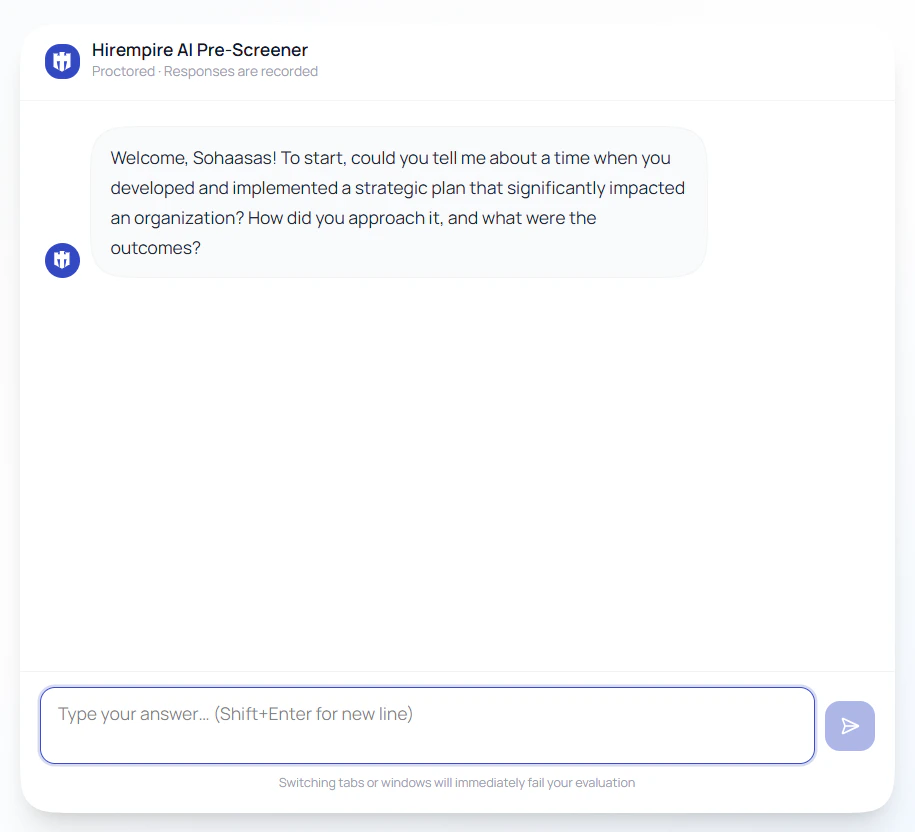
The candidate accepts the ground rules, then has a live conversation with the AI. Proctoring is active throughout — tab-switching, paste attempts, and other integrity violations are detected in real time.
You're notified the moment the interview completes (or terminates early). Open the candidate panel to see the score, scorecard, AI recommendation, and full transcript.
## Proctoring & integrity
Candidates are told upfront that this is a proctored evaluation. The session enforces several anti-cheating measures:
| Check | What it does |
| ---------------------------- | ------------------------------------------------------------------------------------------------------------------ |
| **Tab-switching detection** | Session terminates instantly if the candidate navigates away from the interview page. You're notified immediately. |
| **Paste blocking** | Copy-paste is disabled at the input level — answers must be typed. |
| **Real-time typing** | The AI watches for natural typing patterns rather than pasted blocks of text. |
| **Ground rules enforcement** | Candidates must explicitly accept the rules before the interview starts. |
The AI also probes for specifics — vague or generic answers get followed up on, so candidates can't coast on rehearsed responses.
## What you get back
When the interview ends, the candidate's panel includes a full evaluation:
## How it works
From an applicant card, click **AI Pre-Screen**. A unique, one-time interview link is generated and emailed to the candidate.
The candidate accepts the ground rules, then has a live conversation with the AI. Proctoring is active throughout — tab-switching, paste attempts, and other integrity violations are detected in real time.
You're notified the moment the interview completes (or terminates early). Open the candidate panel to see the score, scorecard, AI recommendation, and full transcript.
## Proctoring & integrity
Candidates are told upfront that this is a proctored evaluation. The session enforces several anti-cheating measures:
| Check | What it does |
| ---------------------------- | ------------------------------------------------------------------------------------------------------------------ |
| **Tab-switching detection** | Session terminates instantly if the candidate navigates away from the interview page. You're notified immediately. |
| **Paste blocking** | Copy-paste is disabled at the input level — answers must be typed. |
| **Real-time typing** | The AI watches for natural typing patterns rather than pasted blocks of text. |
| **Ground rules enforcement** | Candidates must explicitly accept the rules before the interview starts. |
The AI also probes for specifics — vague or generic answers get followed up on, so candidates can't coast on rehearsed responses.
## What you get back
When the interview ends, the candidate's panel includes a full evaluation:
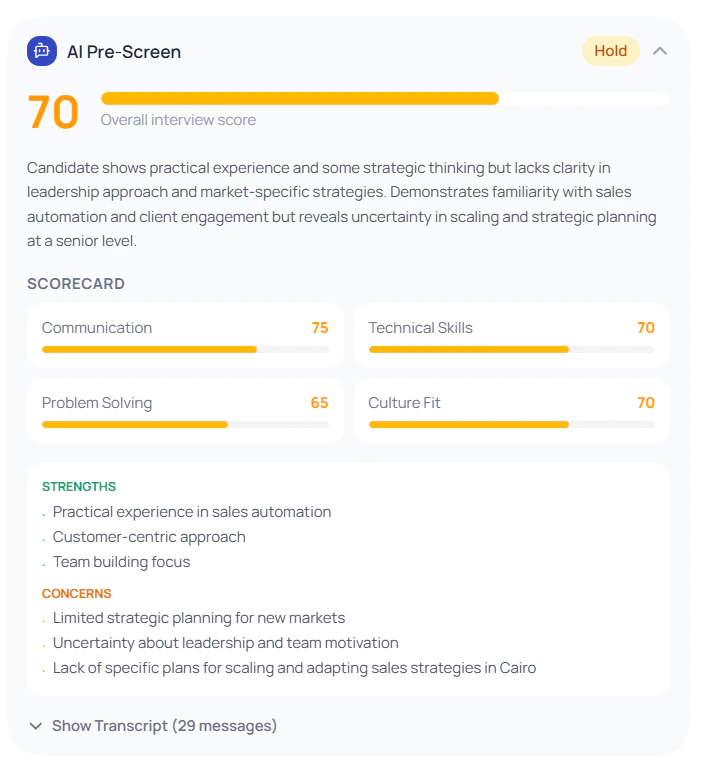 A single number summarizing how the candidate performed across all evaluated dimensions.
Per-dimension breakdown with individual scores and brief notes on each area assessed.
A plain-language hiring recommendation with the reasoning behind it.
Flags around answer authenticity, consistency, and any integrity violations during the session.
Complete record of the conversation — questions asked and answers given — stored permanently on the candidate record.
Get notified the moment the candidate completes — or if the session terminates early due to a violation.
## When to use it
AI Pre-Screen replaces the first-round phone screen. Use it when:
* You have **high applicant volume** and need to triage faster
* You want **consistent evaluation** across every applicant for a role
* You want to **reduce bias** in the first-round filter
* Your candidates are **distributed across time zones** and scheduling is painful
## Sending a Pre-Screen
1. Open the candidate from the **Talents** page or a job's applicants list
2. Click **AI Pre-Screen** on the applicant card
3. The candidate receives an email with a unique link
4. Track status from the candidate panel — Sent, In Progress, Completed, or Terminated
## Best practices
**Use it as the first filter, not the only one.** AI Pre-Screen is designed to replace the initial phone screen — a hiring decision should still combine pre-screen results with CV analysis and a human interview.
**Tell candidates what to expect.** A short note in your application confirmation email explaining that they'll receive a proctored AI interview reduces drop-off and integrity violations.
**Check terminated sessions before rejecting.** A tab switch can sometimes be accidental. Review the transcript before making a decision.
## Related features
* [AI Screening](/ai-features/ai-screening) — automatic CV analysis and job-fit scoring on every application
* [Interview Intelligence](/meetings/interview-intelligence) — AI analysis of full live recorded interviews
* [Hirempire AI](/ai-features/hirempire-ai) — the AI capabilities running across the platform
A single number summarizing how the candidate performed across all evaluated dimensions.
Per-dimension breakdown with individual scores and brief notes on each area assessed.
A plain-language hiring recommendation with the reasoning behind it.
Flags around answer authenticity, consistency, and any integrity violations during the session.
Complete record of the conversation — questions asked and answers given — stored permanently on the candidate record.
Get notified the moment the candidate completes — or if the session terminates early due to a violation.
## When to use it
AI Pre-Screen replaces the first-round phone screen. Use it when:
* You have **high applicant volume** and need to triage faster
* You want **consistent evaluation** across every applicant for a role
* You want to **reduce bias** in the first-round filter
* Your candidates are **distributed across time zones** and scheduling is painful
## Sending a Pre-Screen
1. Open the candidate from the **Talents** page or a job's applicants list
2. Click **AI Pre-Screen** on the applicant card
3. The candidate receives an email with a unique link
4. Track status from the candidate panel — Sent, In Progress, Completed, or Terminated
## Best practices
**Use it as the first filter, not the only one.** AI Pre-Screen is designed to replace the initial phone screen — a hiring decision should still combine pre-screen results with CV analysis and a human interview.
**Tell candidates what to expect.** A short note in your application confirmation email explaining that they'll receive a proctored AI interview reduces drop-off and integrity violations.
**Check terminated sessions before rejecting.** A tab switch can sometimes be accidental. Review the transcript before making a decision.
## Related features
* [AI Screening](/ai-features/ai-screening) — automatic CV analysis and job-fit scoring on every application
* [Interview Intelligence](/meetings/interview-intelligence) — AI analysis of full live recorded interviews
* [Hirempire AI](/ai-features/hirempire-ai) — the AI capabilities running across the platform